
日本語
PDF縦横OCRは、スキャンした書籍や書類のPDFから、日本語の縦書き・横書きの文字を抽出するMac用アプリです。
基本的な使い方
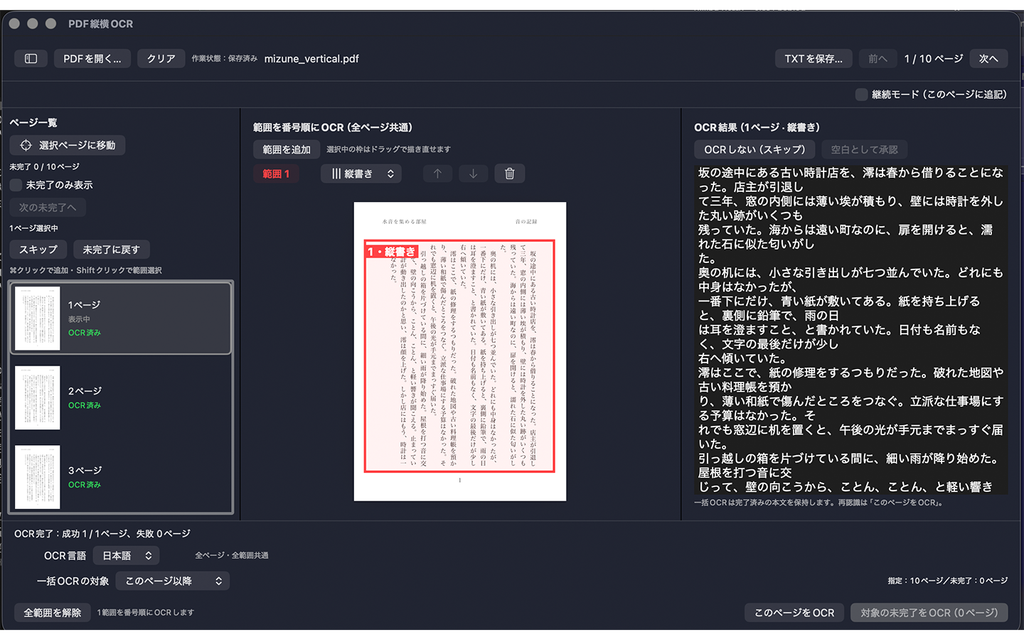
- アプリでPDFファイルを開きます。
- 読み取りたいページを選択します。
- 原稿に合わせて「縦書き」または「横書き」を指定します。
- 必要に応じてOCR対象範囲を指定し、ヘッダーやページ番号などを除外します。
- OCRを実行し、結果を確認・編集します。
- 必要なテキストをコピーするか、TXTファイルとして保存します。
うまく読み取れない場合
原稿と読み取り方向が一致しているか、対象範囲に本文が含まれているかを確認してください。
文字が小さい、画像がぼやけている、ページが傾いている場合は、読み取り精度が低下することがあります。可能であれば、より鮮明で傾きの少ないスキャンをお試しください。OCR結果には誤認識が含まれることがあるため、原稿と照合してください。
購入について
無料で試用し、必要に応じてアプリ内の買い切り購入で機能制限を解除できます。
購入済みの機能が利用できない場合は、購入時と同じApple AccountでApp Storeにサインインしていることを確認し、アプリ内の購入復元機能をお試しください。
お問い合わせ
不具合やご質問は、お問い合わせフォームからお送りください。お問い合わせ内容に「PDF縦横OCR」とご記入ください。
次の情報があると、状況を確認しやすくなります。
- macOSのバージョン
- アプリのバージョン
- 問題が発生するまでの操作
- エラーメッセージ、または問題の具体的な内容
プライバシー
PDFの読み取りとOCR処理はMac上で行われます。詳しくは、アプリのプライバシーポリシーをご覧ください。
English
PDF TateYoko OCR is a Mac app that extracts Japanese text from scanned books and PDF documents, supporting both vertical and horizontal writing.
Getting Started
- Open a PDF file in the app.
- Select the page you want to process.
- Choose vertical or horizontal writing to match the document.
- Adjust the OCR area as needed to exclude headers, page numbers, and other unwanted content.
- Run OCR, then review and edit the recognized text.
- Copy the text or save it as a TXT file.
Improving Recognition
Check that the selected writing direction matches the document and that the OCR area includes the text you want to extract.
Small text, blurry images, and tilted pages may reduce recognition accuracy. If possible, try a clearer, properly aligned scan. OCR results may contain errors, so please compare them with the original document.
Purchases
You can try the app for free and unlock its limits with a one-time in-app purchase.
If purchased features are unavailable, check that you are signed in to the App Store with the same Apple Account used for the purchase, then try the app’s purchase restoration feature.
Contact Support
For questions or technical issues, please use our contact form. Include “PDF TateYoko OCR” in your message.
Please provide:
- Your macOS version
- Your app version
- The steps leading to the issue
- Any error message or a description of what happened
Privacy
PDF reading and OCR processing take place locally on your Mac. For details, see our app privacy policy.